SMS Messaging
Last updated: March 9, 2026
About SMS with Aiko
Aiko Assistant offers optional SMS messaging so you can communicate with your AI assistant via text message. SMS is one of several channels available to interact with your assistant, alongside email and Slack.
How You Opt In
SMS messaging is entirely optional and requires your explicit consent. After purchasing an Aiko Assistant subscription, you can enable SMS from your authenticated dashboard at aikoassistant.com by following these steps:
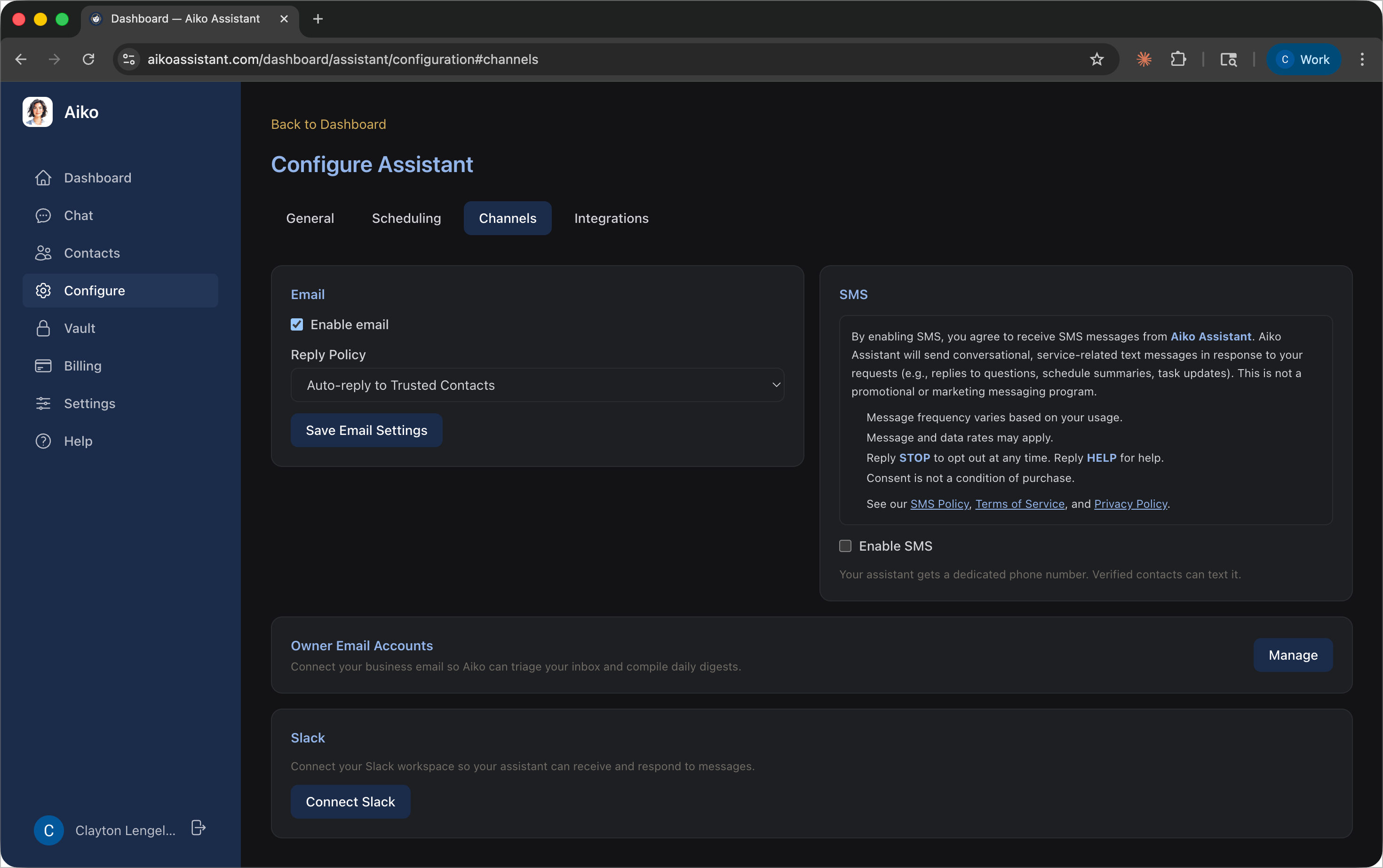
Step 1: Navigate to Channels and review SMS terms
Navigate to Configure → Channels in your authenticated dashboard. The SMS consent disclosure is always visible, and the “Enable SMS” checkbox is unchecked by default. No SMS features are active until you opt in.
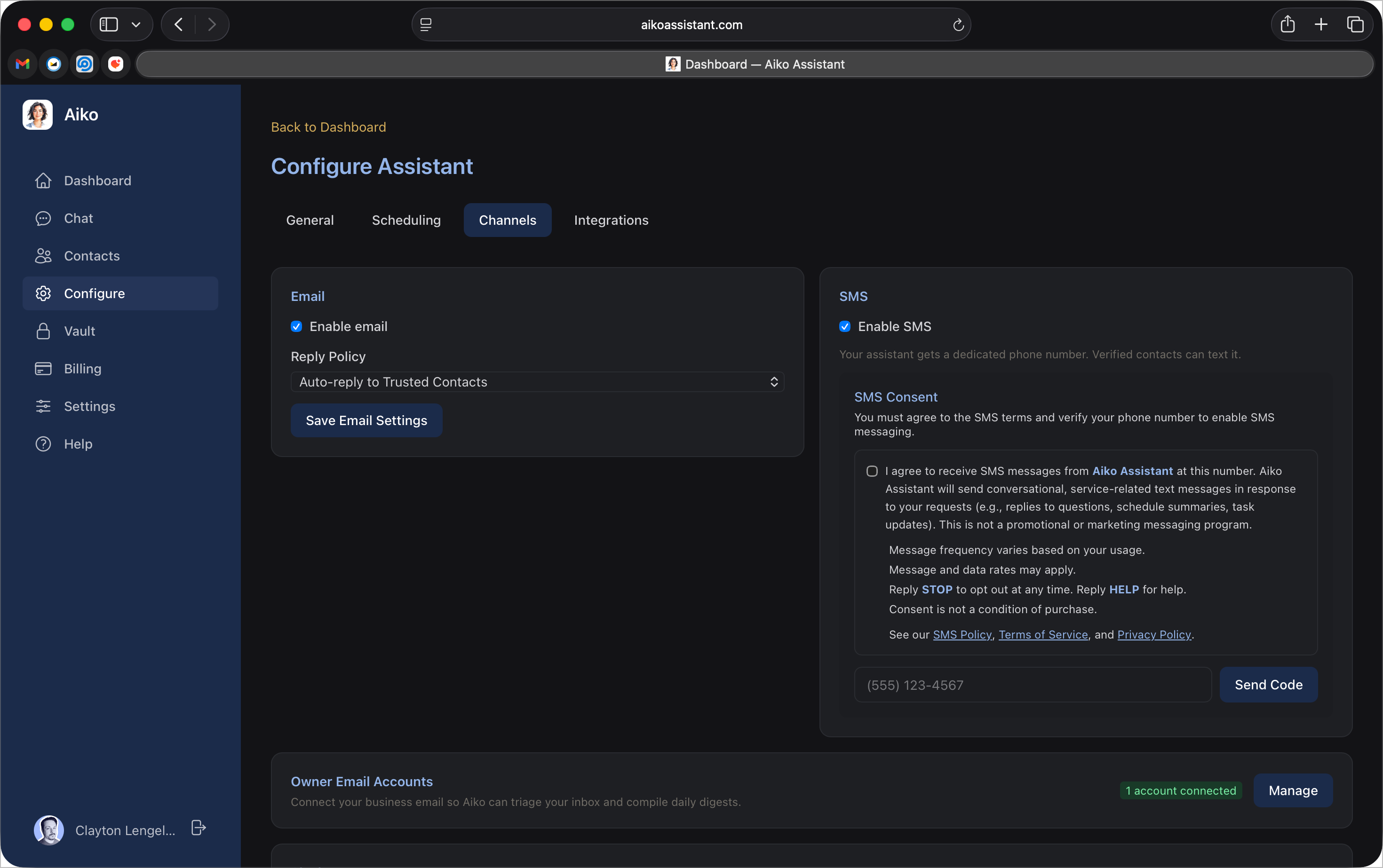
Step 2: Enable SMS and enter your phone number
After reviewing the consent terms, check the “Enable SMS” checkbox to opt in. By checking this box, you agree to the SMS terms displayed above it. A phone number entry field appears immediately — enter your US mobile phone number and click “Send Verification.” The full consent disclosure reads:
“By enabling SMS, you agree to receive SMS messages from Aiko Assistant. Aiko Assistant will send conversational, service-related text messages in response to your requests (e.g., replies to questions, schedule summaries, task updates). This is not a promotional or marketing messaging program. Message frequency varies based on your usage. Message and data rates may apply. Reply STOP to opt out at any time. Reply HELP for help. Consent is not a condition of purchase.”
Links to our SMS Policy, Terms of Service, and Privacy Policy are displayed alongside the consent text.
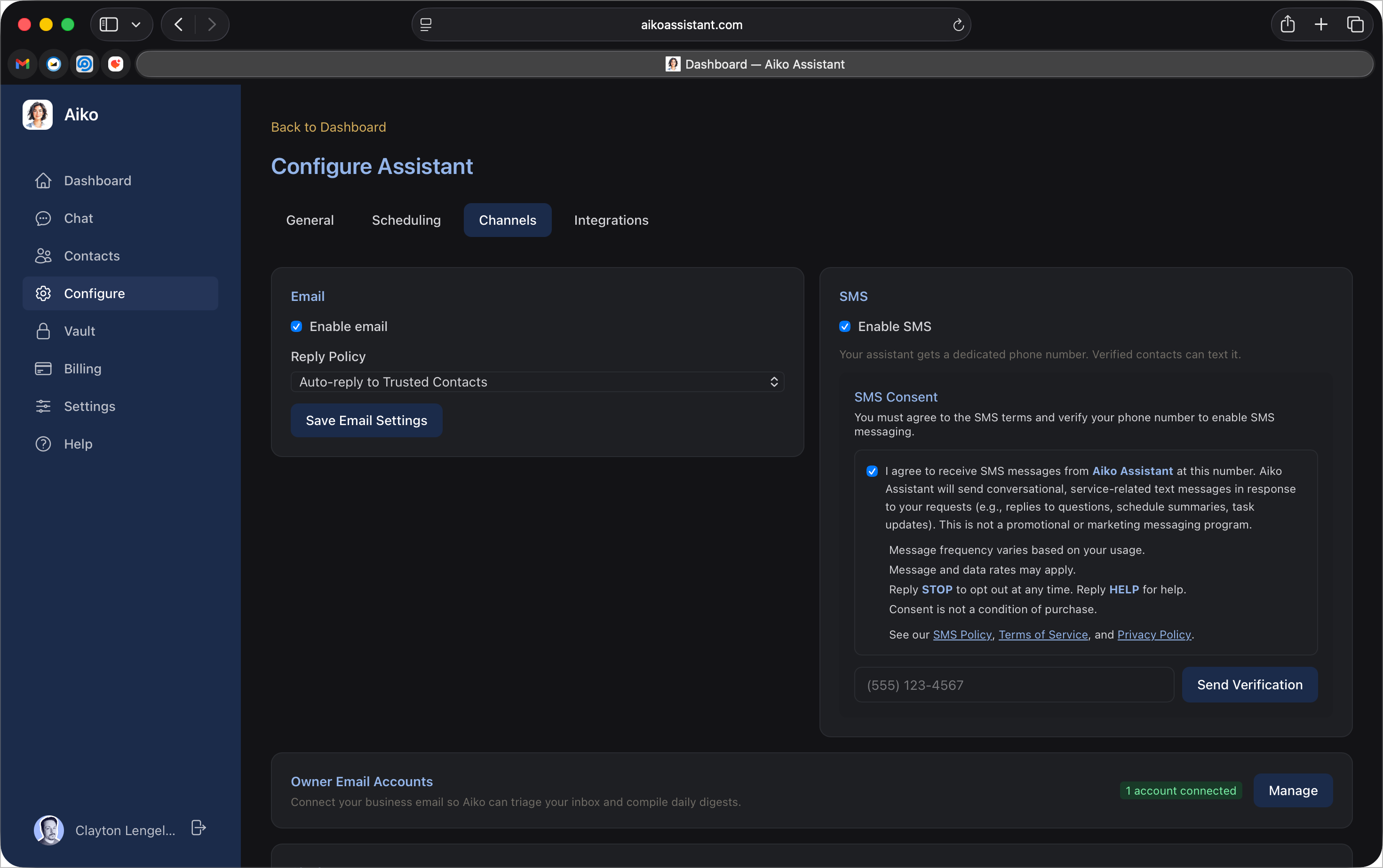
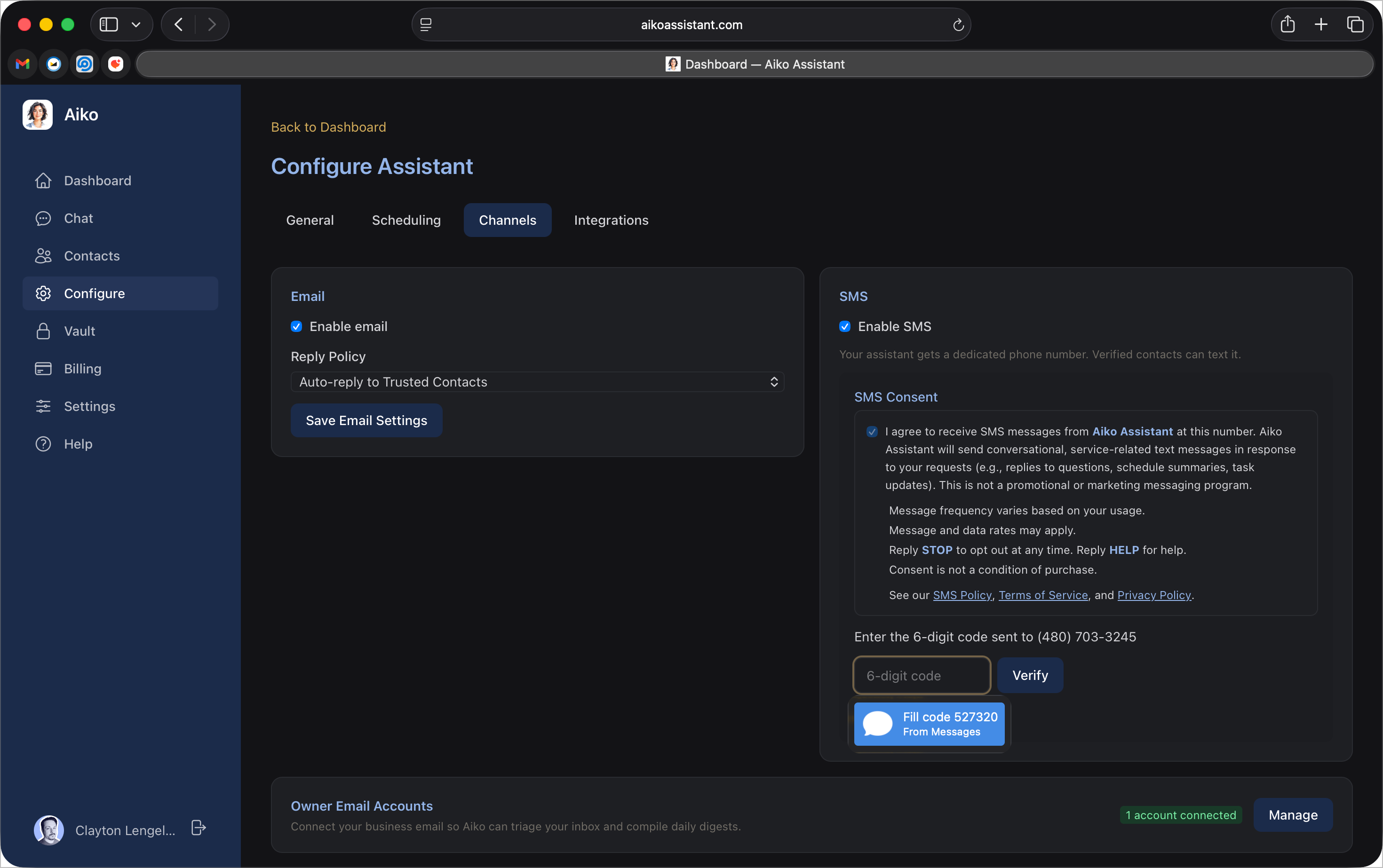
Step 3: Verify your phone number
Enter the 6-digit verification code sent to your phone via SMS. This confirms you own the number.
Step 4: Phone verified, number provisioning
Once verified, a dedicated phone number is automatically provisioned for your assistant. Only verified numbers are enabled for SMS messaging.
Step 5: SMS active
Your assistant now has a dedicated phone number and SMS is active. You can text this number to communicate with your assistant.
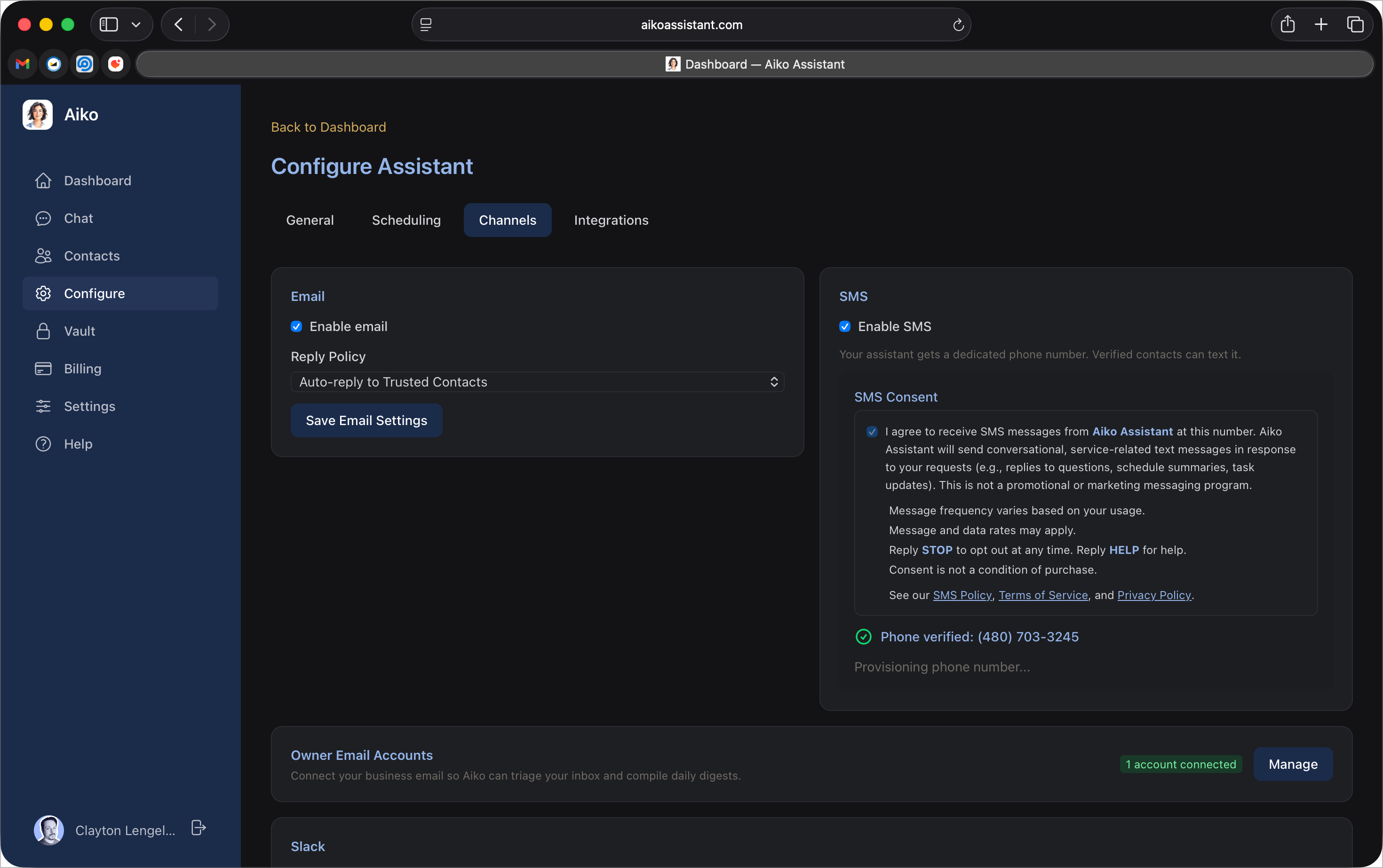
You will not receive any SMS messages unless you complete this opt-in process. Only verified phone numbers can receive messages.
Consent to receive SMS is not a condition of purchase.
Text-to-Join (Public SMS)
Businesses using Aiko Assistant may publish their assistant's phone number on their website, business cards, signage, or other materials. Members of the public can text this number to:
- Ask questions about the business's products or services.
- Request quotes or estimates.
- Schedule appointments or inquire about availability.
- Get general business information (hours, location, etc.).
When you text a business's Aiko Assistant number for the first time, the first reply will include opt-in terms: the business name, a notice that message and data rates may apply, and instructions to reply STOP to opt out at any time.
By continuing the conversation after receiving the opt-in notice, you consent to receive further SMS replies from that business's assistant. You can opt out at any time by replying STOP.
What Messages You Will Receive
Once opted in, your assistant will send you SMS messages in response to conversations you initiate or to deliver information you have requested. This program is conversational and service-related, not promotional marketing. Examples include:
- Replies to questions you ask your assistant via text.
- Schedule summaries, reminders, and task updates.
- Responses to research requests or follow-up information.
Message Frequency
Message frequency varies based on your usage. You control how often you interact with your assistant. Your assistant only sends messages in direct response to your requests or conversations.
Opting Out
You can stop receiving SMS messages at any time by:
- Replying STOP to any message from your assistant. You can also reply END, CANCEL, UNSUBSCRIBE, or QUIT.
- Disabling SMS in your assistant's configuration in the dashboard.
After opting out, you will receive a single confirmation message and no further SMS messages will be sent.
Help
Reply HELP to any message from your assistant for support information. You can also contact us at [email protected].
Rates and Charges
Standard message and data rates from your wireless carrier may apply. Aiko does not charge any additional fees for SMS messaging beyond your subscription.
Privacy
Your phone number and message content are handled in accordance with our Privacy Policy. We do not sell or share your phone number or message data with third parties or affiliates for marketing or promotional purposes. Your mobile phone number and any information collected through SMS interactions will not be shared with or sold to third parties. For full terms governing the use of the Service, see our Terms of Service.
Contact
If you have questions about SMS messaging, contact us at:
[email protected]